All posts by George Brown

Matrix Calculations

Just had a frustrating 2 days dealing with a simple scaling matrix.

I’m removing all openGL and GLKit code, so have to migrate all the GLKit code to simd utilities that Metal uses.

I’d grabbed a matrix_scale function in the simd code to replace a AAPLMathUtilities, but it simply did not work how I expected. It took adding debug code to see the matrix values to pick up on the problem.

Many of Apple’s demo projects include AAPLMathUtilities, this has an proper equivalent to AAPLMathUtilities, matrix4x4_scale, which finally solved my issue.

It’s incredibly frustrating to debug, while the Metal debugging stuff is cool in XCode, it just had a blind spot here.

I hate matrix math.

Still, solving this, removed a huge hurdle, I’m not so far away from completing the transition to Metal.

Progress

Very pleased with my progress. Mostly due to the way the app is architectured, it took a while for me to remember how it was all pieced together, and to adapt it for metal. But now it’s coming back together in my head and with a few key things done, progress is now very rapid.

I used a lot of inheritance, with a key super class doing a lot of heavy lifting, once I’d adapted it for Metal, there’s really only tweaking on the child class to adapt to their particular quirks.

I’m still on the source units, rendering images, video and text, but due to the way they all work, I’ve had to implement most of the pipelines. So it generates texture directly, say using the MTKTextureLoader, to generating core text, which used an FBO in openGL, that’s now a custom render pass in Metal, I just needed to wrap them the same way, such that subclasses don’t care if they’re in an FBO or not.

I used vertex Array objects in OpenGL, but now that’s much better handled in Metal, I define the structs for vertices, with position, texture coordinates and maybe colours, and define a MTLVertexDescriptor and it’s much more elegant.

Overall, I’m hoping to get an update out much sooner than I expected, I’ll disable the very new features I was working on, but they should come rapidly after.

Updates

Progress on migrating to Metal is progressing, with a bit of a slow down over Christmas, I’m getting back into it.

I made a few false steps, and perhaps got a bit too into investigating some of the new features in Metal 4 that I got distracted from just writing the simplest pipeline to start with.

I was also hopeful I could have done some nice mixing and matching of rendering techniques using protocols, but that also while possible, is probably too complex. I’ve ended up making 2 parallel rendering pipelines, one for Metal and one for OpenGL, just copying the classes and removing all the openGL code for the metal pipeline so it compiles, then figuring out how to replace everything with Metal.

There’s some small differences to the APIs, probably the biggest one is switching from using openGL contexts, to using Metal’s Command queues, buffers and encoders. With the context, you can just call opengl code without being aware of the context, with the Metal approach, we have to manage the buffers and encoders and pass them around to the code that’s using them. I do see some potential benefits to this in the future though.

It still broadly fits with my rendering model, so the adaption isn’t too painful.

I’ve now just managed to make a simple full render pass, from generating a texture to getting to a drawable, or rather I’ve done it in theory and the code compiles, now I’m learning about Metal debugging!

Starting the OpenGL to Metal Migration

Having done all the admin and project reorganization without getting too far into it, I’ve started working on migrating to Metal. This took a bit of brushing up, I haven’t really worked with it much apart from a few projects a year or two back, so I had to remind myself of a few things.

I’ve just converted the shaders, or, rather, converted the code from OpenGL to Metal, I get to the tricky part next, which is doing the rendering pipelines, which are very different to OpenGL. There’s also been some updates to best practises in Metal 3, so I’m going to have to learn those as well.

I think I have much in place for the types to share between CPU and GPU, but I’m sure I’ve missed some things, or it’s not quite all there with the new features in Metal, but once I figure out how to do one renderer, the rest should be much simpler, the first one is the hardest.

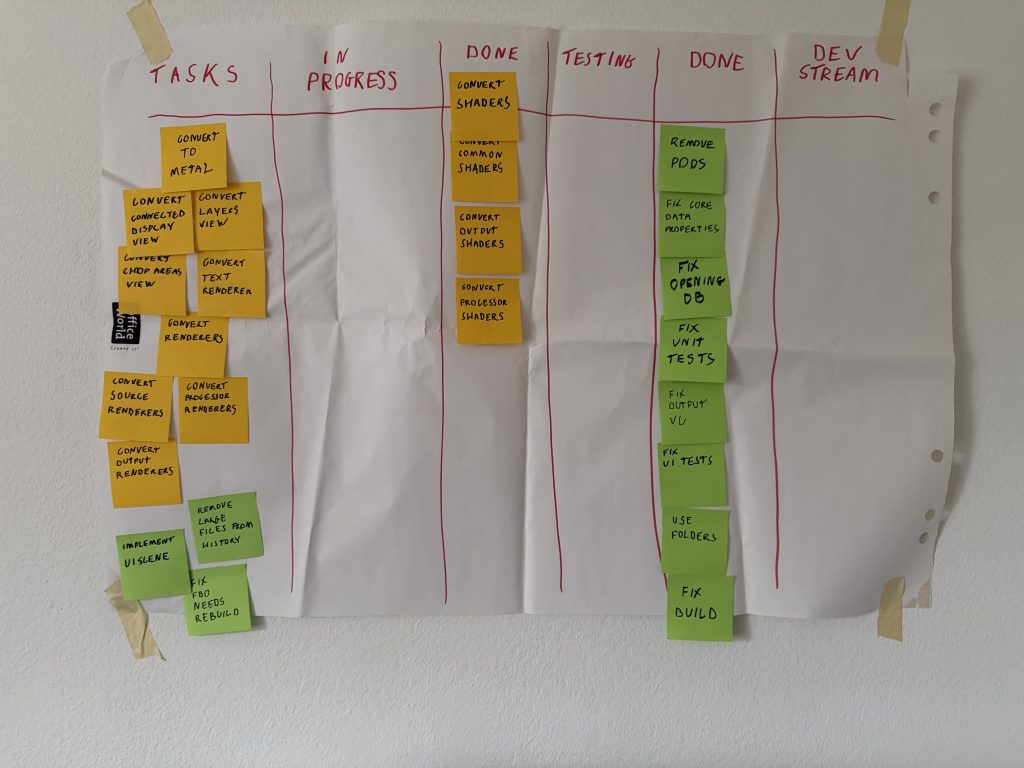
What you see above is my kanban, it looks a bit tatty as it’s gone through a move and been stored away for many years, but it still had all my taks from when I stopped the project, so I just put it back into use, after creating new tasks for the upgrade of course. Once done, I can ressurect some of the old features I wanted to implement.

Constructive Procrastination

With 3 test failures out of 235, things are going well, 2 of those are openGL, so they may no longer be relevant when replaced by Metal.

I spent a day just tidying up the project. This was started before XCode had folders, and it used groups extensively to keep things organized. In Xcode it looked fine, but if you look in the file system, everything was flat. I reorganized the file system to reflect the project structure and converted XCode to use folders (In most cases, I still have a few groups in there).

I can’t really think of anything else to do that I can put off the conversion to Metal, so it goes up on the board, and that’s what I’m going to do next.

Initial Explorations

Most of the Unit tests still run, there seems to be an issue importing files for testing, and there’s some issues with openGL which is going to be replaced.

There’s an issues with opening the core data store, but I think I know what that is, Apple enforced some things around to do with secure coding I remember, from when I abandoned the project I think I might have the fix for that somewhere.

The UI Tests all fail, I wasn’t too surprised, although, I am actually surprised to see anything at all is rendering, dialogs do appear to be triggered, but there are many issues. I want t o revamp the whole UI anyway, it had proto light/dark themes before Apple implemented their own support with what I think is a much better solution with the asset catalogue. And I was doing some other stuff it looks like UIKit doesn’t treat the same as before.

I’m debating what to with the repo, I want to start backing up to github (of course I keep local backups!), but there’s so much history and some of the old pods are causing issues as they have some binaries too large for github. I think I might just create an new orphan branch, and figure out what to do with the rest later.

It Lives!

The Reality Augmenter builds again! It’s nowhere near ready for a new release, but I was kind of dreading this step.

I had to strip out old dependencies, update the project settings etc. Some of the dependencies didn’t exist anymore, or no longer support what I used from them.

The google cast SDK no longer does direct video streaming so that had to go. The Dropbox SDK I used is long gone, I think there’s better facilities but for now I had to remove it. I had found Alamofire still worked, but I discovered I only ever used it for dropbox as it had an OAuth thing. I had a dependency for User Guiding, MPCoachMarks, that doesn’t look it’s going to work without effort.

I was lucky I suppose, the app was a learning project for me and I wanted to learn *everything*, so I usually avoided dependencies, and not to toot my own horn, but the project is well organized and commented, and the code that relied on dependencies was suitably isolated from the rest, that’s good usage of protocols for you. There were a few bits of glue here and there, but I was fearing I might have to do some major rewrites, nope.

Setting things up again

Well, looks like I’m back. It’s been a good few years since i’ve looked at anything relating to this project.

I’ve just been updating the website core, I had some issues with old PHP versions, wordpress versions, goDaddy admin tools being uncoorperative, misconfigured config files, a lot can go wrong in seven years…

I’m back on the current version of WordPress and PHP, some plugins need updating, and the site is looking a bit dated, I’ll take some time to spruce things up over the near future.

I’ve started looking to update the Reality Augmenter for iOS, as Quartz Composer is no longer a thing for MacOS, I’ll probably be discontinuing the MacOS version.

There’s lot to do for iOS still, I have to move from OpenGL to Metal at the least, which will take some time. I have to update various 3rd party libraries and sadly I’ll have to remove the google cast option as the SDK no longer supports direct screen casting. However, I was working on a really cool feature before I mothballed, I thinks there’s still good hope for that.

Anyway, check back for more updates!

Been absent

I disappeared for a while, had to pay the bills and got myself a job as an iOS developer in Lausanne, which also involved moving. The last 8 months have been quite a ride, and I’ve had no time to put into the Reality Augmenter. I’ve had an update in the works for near a year now, but I haven’t looked at the code since the end of last year. Not only do I have to still fix quite a few UI problems with the update, I’ve now got SDKs to upgrade, and adapt to new ios versions.

Now I’ve moved and I’m more properly settled in, I might be able to spend a bit of time on the app again, and get these features I’ve wanted finally finished. The app hasn’t been forgotten, I can’t make any promise on when a new version will be available, but I don’t intend to let it rot.

Development update

Well it’s been a while since I posted here. Still been struggling with iOS 11, apple fixed my core data issues, or rather, they added a new option without really telling anyone they have to use it, and buried it’s scant documentation in a .h file. But it’s sorted, only took a month.

TBH, there seems to be a lot of updates, and the documentation is very poor. We used to get change logs for every class and framework, but that no longer seems to be the case. I might have picked up my problem if the change logs were still issued, but as it was, Apple just added a new vital option and acted suprised when not everyone had gone through every .h file in the system and couldn’t figure out this new feature.

I was not alone in this, I even raised a code level support issue with Apple, where they’re supposed to help you out fixing bits of code you can’t figure out, and whoever got assigned to help me from Apple couldn’t figure it out so they refunded me the support call (we get 2 per year as part of the license).

So, anyway, after finally getting a curt reply on my bugs, I get my app working in iOS11. Yay! Immediately check things are ok by running my tests, and a good bunch of them fail, what’s happened now? Not that many changes in iOS11 affect my code! how can this happen? Well, the new iOS simulators can’t do openGL very well, the simulators run at a snails pace and everything keeps timing out, causing all my fails. Ugh.

Sigh….

Start looking into that, and hooray! the new XCode beta fixes it! I go to install that, and…… it just stops calling the entry points to my openGL code, nothing renders! Another bug, not as catastrophic yet as the previous one, it runs fine on devices on the current version of iOS11, but it puts a bit of a dent in my automated testing. I’ve said it before, but surely this one can’t fester, there must be a thousand and one games using openGL, I await news with baited breath.

Anyway, all this set me back another couple of days, it’s very frustrating, I don’t like having to create example projects isolating bugs for Apple when I should be writing my own stuff. Back to trying to put my new UI changes in place, more soon.